- Joined
- Jan 20, 2004
- Location
- Pictland
Changing your avatar is fairly straightforward, just a few simple steps and it's done.
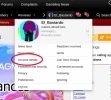
1. Begin by clicking on your user name in the upper nav bar:

2. That will open up a pop-up from which you select "Account Details":
3. Now you are in the area for editing your account:
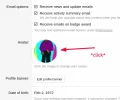
4. Click on whatever your existing avatar is -- likely the default -- and you get a pop-up that allows you to do what you want to do. You'll probably want to select "Use a custom avatar" and proceed from there:
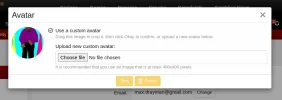
5. Click "Okay" when you're done and that should do it.
- Max
1. Begin by clicking on your user name in the upper nav bar:
2. That will open up a pop-up from which you select "Account Details":
3. Now you are in the area for editing your account:
4. Click on whatever your existing avatar is -- likely the default -- and you get a pop-up that allows you to do what you want to do. You'll probably want to select "Use a custom avatar" and proceed from there:
5. Click "Okay" when you're done and that should do it.
- Max
Last edited:


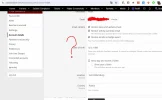


 ))
))