- Joined
- Jan 20, 2004
- Location
- Pictland
Your forum Proifile is what the world sees about you on the forums when they go looking. Some of us like the minimal approach, others are more forthcoming about things like our favourite beverage and what we’ve been watching on the telly. Either way, assuming you want to tweak yours, this is how you go about it.
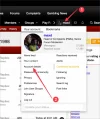
First step is to find your user name in the upper nav bar — see #1 — and then click on “Account details" — see #2 — which will take you to your Profile page:
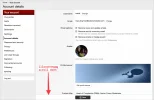
So. Your “Account details” page is all the place where you’ll find a bunch of your preferences, personal details, likes and dislikes, and a shed-load more. It’s a really, really, really long list of stuff and you’re free to choose whatever items you wish to fill out and ignore the rest.
In case you are wondering about the “Your profile” at the top of that left-hand list, this is what a Profile looks like:
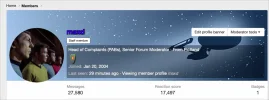
To make a long story short it’s not used much and only pops up when a person’s user name is selected off a list or suchlike. It’s cosmetic, for the most part, but does give you something to play with if your fidget-spinner is off at the shop having the bearings replaced.
There are some areas of that great long “Account details” scroll that are specific — and required — for casino reps. We’ll get to those in a separate tutorial.
First step is to find your user name in the upper nav bar — see #1 — and then click on “Account details" — see #2 — which will take you to your Profile page:
So. Your “Account details” page is all the place where you’ll find a bunch of your preferences, personal details, likes and dislikes, and a shed-load more. It’s a really, really, really long list of stuff and you’re free to choose whatever items you wish to fill out and ignore the rest.
In case you are wondering about the “Your profile” at the top of that left-hand list, this is what a Profile looks like:
To make a long story short it’s not used much and only pops up when a person’s user name is selected off a list or suchlike. It’s cosmetic, for the most part, but does give you something to play with if your fidget-spinner is off at the shop having the bearings replaced.
There are some areas of that great long “Account details” scroll that are specific — and required — for casino reps. We’ll get to those in a separate tutorial.