external image

How to send a private message on CM?

Pyroska

Newbie member
Joined
Jan 22, 2016
Location
Croatia
Hi guys, I know maybe it's a stupid question but can you tell me please how can i send a private message to someone. Can't see that option when I go on someone's profile. Thanks
 
It isn't a stupid question since this forum software is new to me as well, but I figured it out for you. Follow these steps:

1) On the profile page of the user, Click on the "information" tab
2) Under the "interact" section, Click on "Start a Conversation"
 
Well, that isn't visible for me. Is it because I'm listed as newbie member or something?
"PMs" are now referred to as Conversations. No worries about that - PMs stand for Private Messages, but conversations are more intuitive once you get used to them.

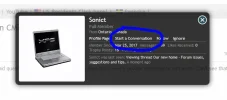
To start a conversation with someone (or PM them if you so insist :p), click their user name and this box should appear:

converse.webp
Click "Start a Conversation" and this thread will appear with your profile - and it is private unless you want to invite others (an option for higher membership status). If you cannot see this link, please let me know.

 
another one....where is my 'inbox' or new version there of (want to see if a PM / conversation has been replied to)
Cheers

Edit: NVM, tired eyes found it now lol :oops:

Give it a few days, you'll start figuring this stuff out. :D
 
Well, that isn't visible for me. Is it because I'm listed as newbie member or something?

That may well be the case since we aren't even a full day into using this new forum software so permissions and things are not going to be correct. Post your feedback in this thread so CM can fix it: https://sussexmskpartnershipeast.com/forums/threads/our-new-home-forum-issues-suggestions-and-tips.82248/

EDIT: Guess you don't need to worry about that since CM responded above!
 
"PMs" are now referred to as Conversations. No worries about that - PMs stand for Private Messages, but conversations are more intuitive once you get used to them.

To start a conversation with someone (or PM them if you so insist :p), click their user name and this box should appear:

View attachment 84738
Click "Start a Conversation" and this thread will appear with your profile - and it is private unless you want to invite others (an option for higher membership status). If you cannot see this link, please let me know.

Actually I can't see that link. Thanks for the graphic content, makes it easier to sort this out.


Write your reply...

Users who are viewing this thread

Accredited Casinos

Read about our rating system and how it's done.
Back
Top